
If you've tried popular generative AI tools like ChatGPT, Gemini, or Claude for a business plan, you already know they're good. Executive summary, market analysis, and financial assumptions can be done in minutes.
But when you dig deeper, things fall apart. The numbers don't hold up, and there's no structured format a lender would recognise. Though it initially felt like a lender-ready business plan, it's not.
So the Bizplanr vs generative AI tools debate is a reasonable one. In this article, I've tested all three AI tools and Bizplanr side by side—what each one actually produces, how the financials compare, a full pricing breakdown, and a straight answer on when each tool makes sense.
The pricing reality: free AI tools vs. Bizplanr
Most people assume this comparison is a free AI business plan generator on one side and an expensive paid tool on the other. And I get why. That's how it looks on the surface.
But the AI tool versions actually worth using for business planning aren't free. ChatGPT Plus, Claude Pro, and Gemini Advanced all run about $20 a month. The free tiers exist, sure, but they cut corners exactly where business planning gets demanding.
Bizplanr has a free plan. Genuinely free. You walk away with a completely generated business plan with all standard sections, a basic financial overview, and a structured format ready to review.
And if you want the full workspace with connected financial projections, scenario planning, visuals, and collaboration, it's a one-time $99.
So the way I see it, this isn't a $0 vs $99 conversation. It's $20 every month for a general-purpose tool you're adapting for business planning, vs. $99 once for an AI business plan generator built specifically for this. Or nothing, if the free plan is all you need.
Get Your Business Plan Ready In Minutes
Answer a few questions, and AI will generate a detailed business plan.
What generative AI tools actually do (and don't) for business plans
I spent a few hours running the same business idea through ChatGPT, Claude, and Gemini to see what each one actually produces. The idea was a specialty coffee shop in Portland, Oregon. Here's what I found.
The starting point is genuinely impressive across all three. Within minutes, you have an executive summary, a market overview, maybe even some financial assumptions. It reads well and looks complete. For getting unstuck early on, any of them will do the job.
But as the US Chamber of Commerce points out, AI tools work best when paired with a structured planning process. And that's exactly where things start to break down.
What they're good at
All three tools handled the narrative side of business planning better than I expected. Here's where each one stood out:
- ChatGPT was the most useful for thinking through the business model. I could pressure-test assumptions, brainstorm revenue streams, and get a rough outline of what the plan needed to cover. The back-and-forth worked well for early-stage thinking.
- Claude produced the most polished writing by a noticeable margin. The executive summary drafted for the coffee shop read naturally and needed very little editing. If the quality of the narrative matters, Claude is the one to reach for.
- Gemini pulled in the most current market data. When I asked about the specialty coffee market in Portland, it surfaced recent statistics and local competitive context that ChatGPT and Claude couldn't match.
For getting words on the page quickly, any of the three will do the job. That part genuinely impressed me.
However…. (they aren’t good at?)
The moment I tried to build something usable out of the output, the process fell apart in the same way across all three.
I asked each tool to build a 3-year revenue forecast for the coffee shop. All three gave me a table with annual figures. Though it looked reasonable, when I changed the average ticket price from $4.75 to $5.25, none of them updated the table. I had to reprompt, and what came back was a brand new table with different expense line items I hadn't touched.
The structural problem was just as frustrating. Halfway through building the plan in ChatGPT, I realised there was no cover page, table of contents, or a way to know if I had the right sections in the right order. The tool had no awareness of what an SBA lender actually needs to see. I was guessing and hoping I'd covered everything.
And at the end of all three sessions, I still had content spread across chat windows, a spreadsheet, and a Google Doc; none of it was formatted or connected, and needed to be manually assembled into something submittable.
There's another cost that's harder to quantify. By the time you've spent enough time prompting ChatGPT to produce a plan you're reasonably happy with, you've become an expert in prompting but not in your own business.
You know which phrases get better output. You've iterated through a dozen versions of your executive summary. But you're no closer to understanding whether your unit economics actually work.
And the stakes here are real. A business plan determines whether a bank approves your loan, whether an investor takes the meeting, and whether your business gets funded. Trusting that to a general-purpose AI tool that reassembles its understanding of a business plan from training data every time you prompt it; that's a significant risk when your business and your funding are on the line.
None of that is a flaw in the tools. It's just not what they're built for.
If you want to get more targeted output from ChatGPT, this guide on AI prompts for business plans is worth checking out.
What does Bizplanr give me that a ChatGPT, Gemini, or Claude prompt can't?
Generative AI tools like these (or any that you've tried) are good at writing, brainstorming, and research. What they can't do is build. And building is most of what a business plan actually requires.
After spending time with all three, I kept ending up with decent sections in a chat window, financials in a separate spreadsheet, and no clear way to pull it all into something I could actually submit. Writing wasn't the problem, but everything around it was.
So I ran the same business idea through Bizplanr. The difference was immediate. The structure was already there with every section in the right place and order. The financials were connected to my actual inputs and not pulled out of thin air.
And when I was done, I had a formatted document ready to export, not a collection of chat outputs I still needed to assemble.
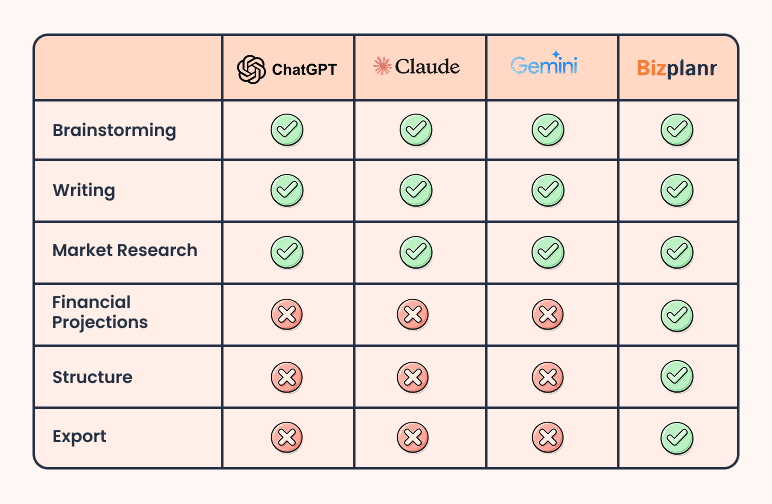
Let me break down those features:
1) Investor-recognized structure
Bizplanr follows the standard business plan structure that SBA lenders and investors expect to see. Every section is in the right place, and you can edit individual sections without affecting the rest of the plan.
When you ask AI tools to write a business plan, each one first has to figure out what a business plan is (pulling from its training data to understand what one looks like), and then generate something based on that understanding. They might or might not get the sections right.
But none of them have any way of knowing what a specific SBA lender looks for, what gets an application rejected, or what a bank loan officer flags in the first 60 seconds of review.
Bizplanr doesn’t assemble a structure from a prompt. The framework is built around how lenders and investors actually evaluate plans: what they look for and what gets applications rejected. That's a different starting point entirely.
For a closer look at what lenders expect to see, here's how to format a business plan.
2) AI writing assistance throughout
Bizplanr's built-in AI writing assistant works differently from opening a new ChatGPT, Claude, or Gemini session. It has the full context of your plan from the start (your business model, your market, your financial assumptions), so when you ask it to rewrite your executive summary, it doesn't produce something generic. It produces something specific to your business.
You can ask it to rewrite a section, shorten it, expand it, or adjust the tone depending on who's reading the plan. Pitching to an investor sounds different from applying for an SBA loan, and the assistant accounts for that. And because it works at the section level, changing the tone of your executive summary doesn't affect anything else in the plan.
3) Built-in visuals and formatting
When you export a plan from Bizplanr, you get a formatted document with a cover page, table of contents, financial charts, and projections laid out the way a lender expects to read them.
Users can drag and drop charts, tables, and formatted sections inside the platform, and their financials embed directly into the plan. There is no need for a separate spreadsheet, manual assembly, or designing a cover page from scratch.
4) Collaboration without the version confusion
Most people's first instinct is to paste the plan into Google Docs and share it. That works for text, but the moment a co-founder updates a financial assumption, nothing else in the document knows about it. You're back to manually checking that the numbers in your executive summary still match the projections on page 12.
With Bizplanr, collaboration happens inside the plan itself. A co-founder can update a revenue assumption, and the financial statements update across the whole plan automatically. An advisor can comment on a specific section without touching the structure. Everyone works on the same live document, not a copy of a copy passed around over email.
5) Connected financial projections
Your income statement, cash flow statement, and balance sheet are all linked to the same inputs with Bizplanr's financial projections tool. So if you change one number, that single change affects your revenue, your gross margin, your COGS, your break-even point, and ultimately your cash flow runway.
ChatGPT and other generative AI tools produce static tables. They have no awareness of how one number flows through to another. A Bizplanr plan does, because the logic was built in from the start.
Moreover, the tools also produce 1 to 5 year forecasting, a visual dashboard, and scenario planning to test conservative, moderate, and aggressive projections.
How does Bizplanr work (compared to these AI tools)?
I'd describe the experience as the opposite of prompting. Instead of writing prompts and hoping for the right output, you answer structured questions about your actual business, and Bizplanr builds from those. Here's how:
Step 1: Fill in your business details and get a complete plan (for free)
Start with the basics (your industry, business model, stage, and location) and then answer a focused set of follow-up questions. Bizplanr will give you a fully structured business plan with all standard sections in under 5 minutes.
It's a basic (free version) plan, but it's enough to get a real sense of what Bizplanr produces and whether it's worth going further. If it is, that's where you can opt for the paid version.
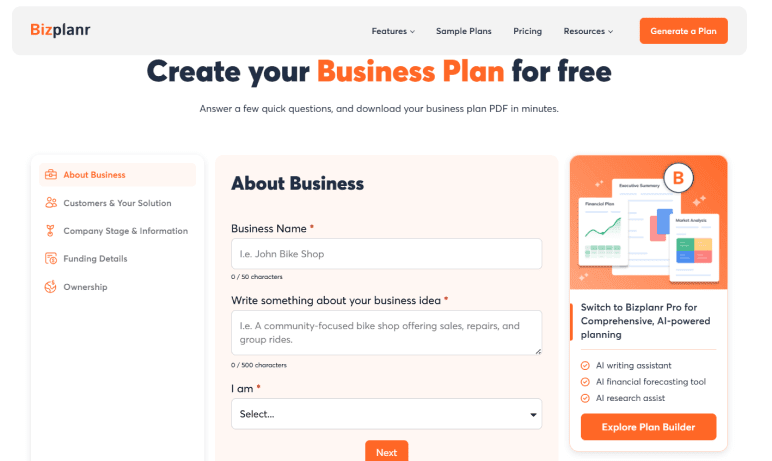
Step 2: Build it out in the Bizplanr workspace
If the free plan covers what you need, you're done. If you need deeper financials, custom visuals, collaboration, and a fully formatted export, the paid workspace unlocks all of that. Once you're in, here's what you can do with the paid version:
- Rewrite individual sections with the AI assistant
- Drag and drop visuals directly into your business plan
- Build connected financial projections where changing one number updates everything automatically
- Test conservative, moderate, and optimistic scenarios to see how your numbers hold up
- Collaborate with a co-founder, advisor, or stakeholders in real time
- Export a formatted PDF or Word doc when needed
That’s it, that all there’s to it.
Can I actually hand an AI-generated business plan to a bank or investor?
Honestly, investors and lenders don’t care how you built your plan. What they want to know is whether it's complete, if the numbers make sense, and if you understand your own business.
Writing is almost never the problem with most AI-generated plans. From testing all three tools myself, the failure point is almost always the same—a lender sits down with the plan, starts asking questions, and it falls apart. Typically, because of one of these three reasons:
- Important sections are missing that the lender expected to find
- The financials don't reflect the actual business as the numbers that look generated rather than modelled
- The projections have no real logic connecting them to the underlying assumptions
That's a hard conversation to recover from.
The SBA outlines specific requirements for what a business plan needs to include. Connected financial statements are one of them. You can also check SCORE's free business plan template to see exactly what lenders expect before you start building.
A Bizplanr plan is different because you're involved in building it. The structure follows a framework that lenders recognize. The financials come from your actual inputs. And because you've answered specific questions about your business to get there, you actually know what's in the plan and why. That's what makes it something you can walk into a meeting with confidence.
Here's a sample Bizplanr plan so you can see exactly what the output looks like: TransCargo Sample Business Plan
Here’s an easy way to test: generate a free plan!
If you're still on the fence, the simplest thing to do is generate a free plan and see what comes out. All you have to do is fill in your business details, answer a short questionnaire, and you'll have a complete basic plan in minutes.
The free version is a basic plan, so the full financial forecast and visuals aren't included. But it's more than enough to decide whether the paid version makes sense for you.
Get Your Business Plan Ready In Minutes
Answer a few questions, and AI will generate a detailed business plan.
Frequently Asked Questions
Can I use ChatGPT or Claude to write my plan and then bring it into Bizplanr?
Yes, and it's actually a reasonable workflow. Use ChatGPT or Claude to brainstorm ideas and draft rough content, then bring those inputs into Bizplanr to build the structured plan and financial model. You get the speed of AI drafting with the structure and accuracy of a purpose-built planning tool.
Is the free Bizplanr plan good enough to show a lender or investor?
The free plan gives you a complete basic plan that covers all standard sections. For a lender or investor meeting, the paid version is worth it, as that's where you get the connected financial projections, scenario planning, and formatted export that make the plan submission-ready.
What happens to my plan if I start with the Bizplanr free version and upgrade later?
Your plan carries over completely. Everything you built in the free version is there when you upgrade, so you don't need to start from scratch. The paid workspace just gives you more to work with on top of what you already have.
Do I need any financial background to use Bizplanr?
No. You don't need to be an accountant or have any financial expertise. Bizplanr's forecasting tool is built around your inputs (pricing, volumes, costs) and handles all the calculations automatically. If you know your basic business numbers, you have everything you need.
How is Bizplanr different from other AI business plan generators?
Most AI plan generators produce a complete plan from a single prompt and require heavy rewrites to make it usable. Bizplanr uses a guided planning workflow with structured inputs, section-level editing, and a financial engine built on your actual assumptions. The result is a plan you can review, adjust, and defend.


Follow Vinay Kevadiya

