

If you've been looking around at AI business planning tools, you've probably bumped into ProAI more than once. And honestly? It's a solid tool.
You sign up, answer a few questions, and a first draft is ready in minutes. That said, the financials are grounded in real consulting data, and the AI advisor (Ace) gives you proper answers instead of generic fluff. So, it works really well for the right founder.
But the question is who that founder actually is. From what I’ve seen, ProAI is built for a specific profile: Investor-track or growth-stage, US-based, and prepping for serious investor conversations.
If that's not you, you'll be paying for a tool that's solving a problem you don't have yet. That mismatch is what sends most people looking beyond ProAI.
That's why I tested 6 ProAI alternatives with a real business idea to help you find the right fit for your situation. But first, let’s understand:
What ProAI gets right? (and where it falls short?)
When I ran my business idea through ProAI, here's what I noticed. The free version is really useful.
You answer a few quick questions about your business, and ProAI generates a full plan covering all the standard sections. The output reads clean, not like generic AI fluff.
When you click into the custom plan, the tool takes you to a workspace where things get more detailed. You can fill in your company info, competitors, team, and financials yourself, or let ProAI's AI handle them if you're not sure where to start.
As mentioned earlier, Ace (the AI advisor) gives proper suggestions when you get stuck. Ask it about pricing strategy, and you get cost-plus, value-based, and competitive options laid out. The financials are also grounded in real consulting data, so the forecasting feels realistic instead of made up.
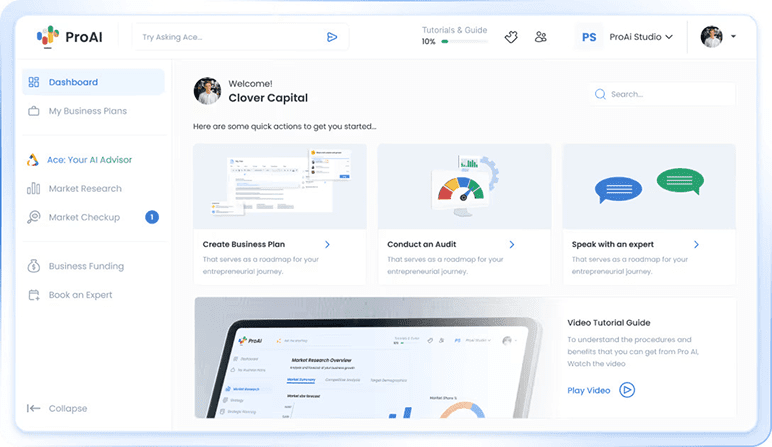
So yeah, the tool delivers. But here's where things get tricky:
- The financials are yearly only with no monthly breakdown, and the AI can get repetitive on niche businesses. (Flagging based on existing user reviews)
- Also, the financial editing is restricted in the free version. The forecast growth rate locks in year one, so you can't gradually adjust it over the years.
- The pitch deck most readers expect from a planning tool isn't on ProAI's entry plan. The Entrepreneur Starter Kit only covers the business plan and financials.
- The investor list comes with a higher-tier upgrade, but it still mostly sticks to investors in your registered country. So the global database can feel pretty local in practice.
On top of all that, ProAI's refund policy is unforgiving. As per their terms, the subscription becomes non-refundable as soon as you download the business plan or financial model. So unlike most planning tools, there's no real safety net once you're in.
If any of these gaps sound like a dealbreaker for your planning approach, the alternatives below might serve you better.
But before jumping into the list, I’ll show you how I tested each tool and what you should check before you commit to one.
How I tested each ProAI alternative?
I tested each of the six tools the way an actual founder would, paying attention to the same things across all of them. The differences that show up are the ones worth knowing.
Here's what I checked, and what you should too, before paying for any of them:
1. Pricing transparency
Are tier prices visible without signing up? Some tools make it really hard to tell which plan includes what, and you only realize once you've paid. The good ones have a clean pricing page that shows you exactly what's in each tier, no guessing.
2. User reviews
Are the G2, Capterra, and Trustpilot reviews from real users, or paid for? Paid reviews tilt positive, so the rating you see isn't always the rating that's earned. A 5.0 from mostly "Vendor Referred" reviewers reads differently from a 4.7 with organic ones.
3. Free preview depth
Can you actually see the full output before paying, or just a teaser? A real free version shows you what you're really getting. Where the preview stops usually tells you everything you need to know.
4. Editability after generation
Can you rewrite and restructure the AI's output, or are you stuck with it? Locked outputs become problems the moment your numbers change. Most AI tools generate a decent first draft. The trouble starts when you try to work with it.
That's how I separated the strong tools from the rest. Now, let's look at how the 6 alternatives compare to ProAI.
Top 6 ProAI alternatives and competitors to know in 2026
Here's how the six alternatives stack up at a glance:
| Tool | Price | Best for | |
|---|---|---|---|
| Bizplanr | Free / $99 lifetime | Building a simple, editable plan without a subscription | |
| Upmetrics | $14–$37/month | Investor-ready pitch decks, multi-year forecasts, and team collaboration | |
| Venture Planner | Free / $24–$64/month | Working through a structured planning exercise step by step | |
| 15minuteplan | Partial free/ $69–$99 (one-time) | A fast, bank-ready draft when speed matters most | |
| PrometAI | Free / $55–$445/month | Strategy-heavy planning with built-in business frameworks | |
| Venturekit | Free / $8/month | A clear plan with a pitch deck attached, generated fast |
Now, let’s walk through each one in detail:
1. Bizplanr
Bizplanr is the most accessible alternative to ProAI on this list. It's built for founders who want to focus on the planning itself, the writing, the financials, and the editing. All without paying annually for funding tools they don't need yet.
What I found after testing Bizplanr
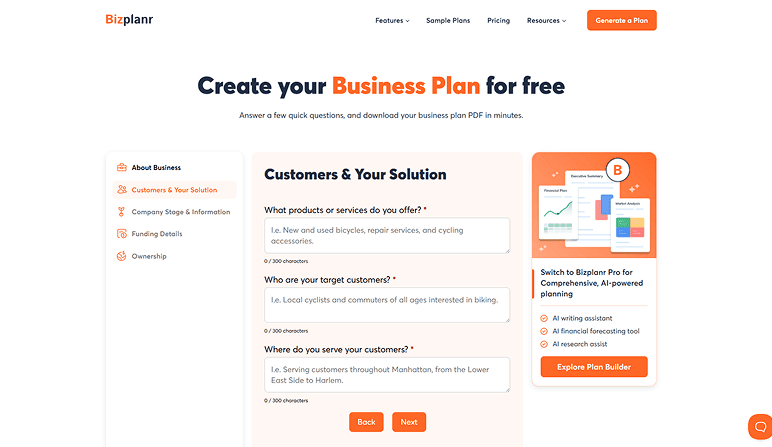
On the surface, Bizplanr and ProAI do the same thing. Both generate a full free draft, both read clean, and both cover the standard sections. The real difference shows up after that, in the editing, the financials, and the pricing model.
ProAI's free draft is genuinely useful. But the moment you want to view a full draft, edit sections, or do real work in the tool, you'll need subscriptions. And the features like industry reports, pitch decks, and the investor list sit on the higher tiers ($240 to $360 per year).
Bizplanr handles this differently. The free version lets you generate, review, and download the first draft as a PDF without signing up or entering a card. For a quick first draft, that's all you need.
But if you want to keep working on it, $99 gets you the full workspace for lifetime access. So it’s more affordable compared to what ProAI charges every year, and you don't lose access if you stop paying.
One thing worth knowing, though: Bizplanr doesn't include industry reports or a pitch deck builder. It’s built around the planning process itself, not the investor-pitch ecosystem. Within that focus, the tool delivers.
Here are a few key features that stood out to me during the trial of Bizplanr:
Built-in AI assistance
The tool has built-in AI assistants that help with plan writing, research, and financial forecasting, rather than a single general advisor like ProAI's "Ace". Each one handles a specific part of the plan, so you get focused help where you need it.
AI-assisted customization
ProAI's editing is restricted; the financial forecasts are yearly only with a locked Year 1 growth rate. In contrast, Bizplanr lets you edit each section independently without regenerating the whole plan.
Realistic financial forecasting
ProAI's financials sit inside the plan document with a locked Year 1 growth rate. Bizplanr has a separate financial module with a visual dashboard.
You set pricing, costs, and growth assumptions, and the income statement, balance sheet, and cash flow recalculate automatically. And the visual dashboard shows revenue, expenses, and cash flow as charts instead of just rows of numbers.
Collaboration with version control
Bizplanr supports real-time, role-based collaboration. Invite one co-founder or advisor, and you can both edit different sections at once, with version control tracking every change. ProAI does allow multiple users, but it lacks real-time editing, version tracking, and change history.
In addition to that, I could download my plan in multiple formats (PDF, Word, and Excel), along with the options to share it via email and link when needed.
Plus, Bizplanr gives you a free iOS/Android app to review and edit your plan from your phone.
One thing I’ve noticed is that Bizplanr does miss a few features that more advanced tools like Upmetrics offer, including strategic planning, pitch deck creation, and detailed forecasting. That said, compared to ProAI, Bizplanr still comes out ahead.
Pricing
- Free: $0
- Paid: $99 (one-time, lifetime access)
Ratings
| Platform | Rating |
|---|---|
| G2 | 4.9 |
| Capterra | 5.0 |
2. Upmetrics
Upmetrics is the all-in-one business planning software compared to ProAI. It's built for founders who want serious planning depth, detailed financial projections, strategic frameworks, scenario testing, and a pitch deck, all in one platform.
And it costs less than ProAI's entry tier, just $14/month on the Premium plan, compared to $20/month on ProAI.
What I found after testing Upmetrics
Upmetrics is designed as a complete planning workspace, and it shows. ProAI felt like a one-shot business plan generator with funding tools tacked on.
Both tools generate solid first drafts, but Upmetrics gives you room to refine, scenario-test, and keep working on the plan as the business grows.
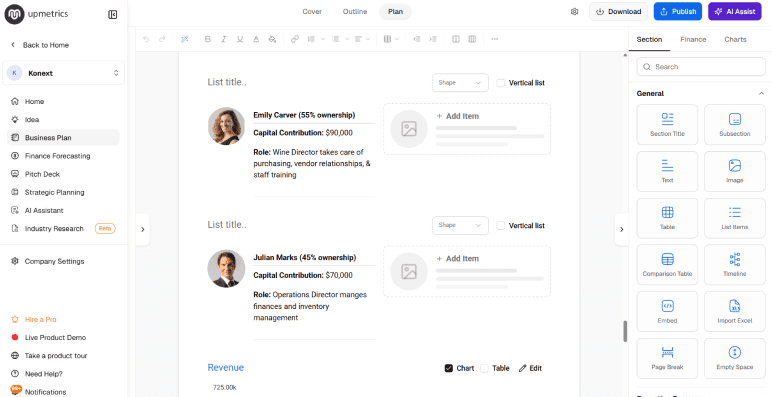
The pricing surprised me, too. ProAI starts at $20/month and goes up to $40/month depending on tier. Upmetrics starts at $14/month (billed annually), and that lower price genuinely includes more:
- AI-guided plan builder: The tool walks you through a structured questionnaire about your business, then generates a full first draft covering all the standard sections, with editable AI suggestions throughout.
- Detailed financial forecasting: Unlike ProAI, you can build forecasts up to 7-10 years with editable assumptions. Run different scenarios side by side, with the income statement, balance sheet, and cash flow updating together.
- AI Industry Research Reports: AI-assisted market research with expert review for clarity, so you don't have to bounce between Google, ChatGPT, and Statista to fill in the research-heavy sections.
- AI pitch deck builder: You can generate an investor-ready deck that pulls directly from your business plan. No manual rebuilding in PowerPoint or Canva from scratch.
- Strategic planning toolkit: Business Model Canvas, Lean Canvas, SWOT, and other strategic tools, all built into the workspace for mapping the business model alongside the plan. ProAI doesn't offer this.
- Team collaboration: Upmetrics allows up to 5 team members per workspace. Co-founders, advisors, or accountants can edit different sections at the same time, with version tracking on every change.
On top of that, this alternative offers 400+ industry-specific sample plans, from coffee shops to SaaS startups to medical practices. So you have a real template to reference instead of starting from a blank page.
It also integrates directly with QuickBooks Online and Xero. Your forecasts can pull real accounting data, so when projections drift later, the actuals are already there.
And one thing I'd say matters more than people think: Upmetrics has a 15-day money-back guarantee, which makes trying it lower-risk. ProAI doesn't refund anything once you've downloaded the plan.
While I really enjoyed using Upmetrics overall, I'd flag that it takes a bit longer to get the hang of than ProAI's questionnaire-style flow. A small learning curve upfront, but the depth makes it worth it.
Pricing
- Premium: $14/month (billed annually)
- Professional: $37/month (billed annually)
Ratings
| Platform | Rating |
|---|---|
| G2 | 4.8 |
| Capterra | 4.9 |
| Trustpilot | 4.6 |
3. Venture Planner
Venture Planner is built for founders who want a structured planning exercise rather than a fast lender-ready draft. It uses a multiple-choice questionnaire (no typing required) that takes you through frameworks, financial modeling, and strategic sections step by step.
What I found after testing Venture Planner
Using Venture Planner felt different from the start. There's a bit of setup requirement before you generate a plan.
You pick a detail level, define your markets and products, choose your planning depth, and only then move into the questionnaire. That said, ProAI gets you to a draft faster. Venture Planner makes you think first.
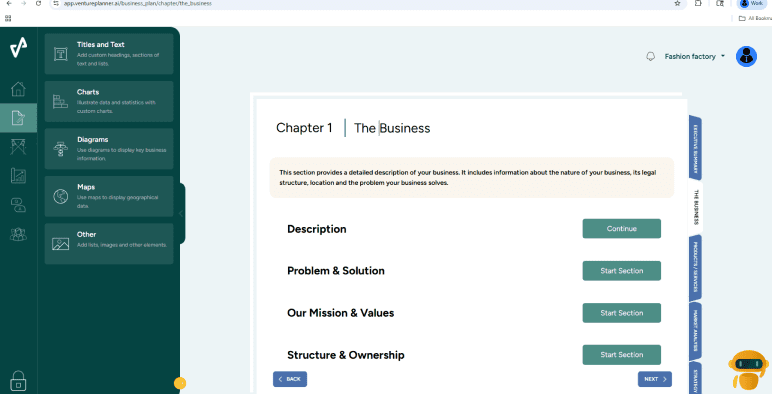
What stood out as I worked through it was how organized the workflow felt. Venture Planner breaks the plan into clear chapters and sections, walking you through each one in order. Each chapter has dedicated modules, including frameworks like SWOT and competitor analysis, built into the workflow.
It feels less like AI just "writing a plan" and more like a structured planning exercise. ProAI doesn't break plans down into these frameworks the same way.
The financial forecasting is also legitimate. Forecasts run up to 7 years, with best/worst/realistic scenario planning and multi-currency support.
Importantly, the forecasts are generated by an enterprise-grade financial modeling engine rather than AI, so the numbers don't suffer from AI hallucinations the way some other tools do.
But once I moved past the strategic frameworks and forecasts, the cracks started showing:
- Generic AI output, especially on niche businesses. Plans read more like auto-written summaries of your inputs than real strategic insight.
- No AI rewriting after the first draft. If you want to adjust tone, shorten a section, or expand a paragraph, you're doing it manually.
- Locked plan structure. You can't add new sections, rearrange the layout, or reorganize chapters.
- Export formatting breaks in PDF and Word. Tables and layout-heavy financial sections often lose alignment when exported.
The one I'd flag more: Venture Planner has no pitch deck builder. ProAI has one on its higher tier. And if you're going to be presenting to investors, you'll want it built in rather than rebuilding the deck from scratch later.
On top of all that, user reviews aren't great either. Most complaints are about recurring billing and generic AI output, both of which lined up with my own experience.
Pricing
- Free Account: $0
- Business Subscription: $24/month (billed annually)
- Consultant Subscription: $64/month (billed annually)
Ratings
| Platform | Rating |
|---|---|
| Capterra | 4.0 |
| Trustpilot | 2.9 |
4. 15minuteplan
15minuteplan is a simpler, faster planning tool that could replace ProAI for founders who need a quick first draft, without requiring all the funding features.
It uses a short questionnaire and GPT-3.5 or GPT-4 (depending on the tier) to create a structured plan in under 15 minutes, with SBA-approved templates.
What I found after testing 15minuteplan
The 15-minute promise is genuine. You answer a 7-step questionnaire about your business, pick a language, and a free draft is ready in minutes.
The plan format follows SBA guidelines, which is the same lender-ready structure ProAI delivers. So if your end goal is a clean plan to take to a bank for a loan, this gets you there fast.
But here's the catch. Your first draft isn't fully visible until you pay. The free version shows you a partial preview, not the complete plan, so you're committing without seeing the full output.
Even the pricing only appears after the preview generates, which is a slightly unusual move for a paid tool.
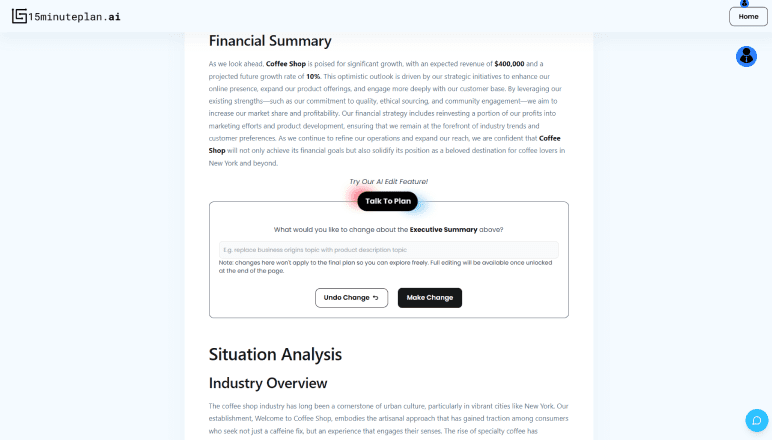
Also, the "Talk to Plan" editing feature is supposed to help refine sections, but it just kept adding more content instead of tightening it up. I'd ask for "more depth" and just get more words, not better content.
ProAI does this slightly better. But on niche businesses, neither tool gets it right without specific inputs.
And the financials run into the same kind of limits. If your numbers change, you're either regenerating the whole plan or editing manually outside the tool. Similarly, ProAI has its own forecasting constraints.
Overall, if you want a plan that grows with your business, advanced planning tools like Upmetrics can be a better choice. You'll get editable financials, a pitch deck, and the flexibility 15minuteplan just doesn't have.
Pricing
- Starter: $69 one-time (3 plans, 10 pages)
- Professional: $99 one-time (10 plans, 20 pages)
Ratings
| Platform | Rating |
|---|---|
| Trustpilot | 4.5 |
5. PrometAI
PrometAI is a strategy-heavy planning tool, not just a quick draft generator. It walks you through a structured questionnaire and builds the plan around dedicated frameworks like SWOT, PESTEL, DCF valuation, Porter's Five Forces, and VRIO.
What I found after testing PrometAI
The first thing I noticed using PrometAI was how much depth it tries to give you.
ProAI hands you a polished plan and pushes you toward the funding side. PrometAI is more like a strategic planning workspace, with frameworks layered into every section.
The structure is genuinely useful if you want to think through your business, not just create a document. SWOT, PESTEL, and Porter's Five Forces are built into the workflow, not optional add-ons.
The valuation tools (DCF and multiples) are also more advanced than what ProAI offers, which makes the financial section feel closer to what an analyst would build.
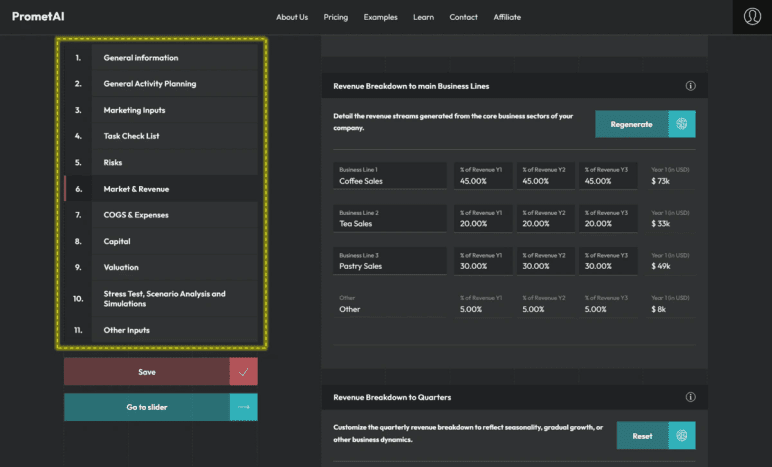
However, there are a few limitations:
- The plan is locked once it's generated. You can't easily rearrange sections, change the layout, or refine content with AI. ProAI has its own editing limits too, but at least the basics stay adjustable.
- Pricing starts at $55/month, with the strategy frameworks locked behind the $145/month Pro tier. For most solo founders, that's a tough sell compared to ProAI's $120/year entry tier.
- No real collaboration. No real-time editing, no version history, no way to bring in a co-founder or accountant, or an advisor. ProAI handles this better with team access on its higher tiers.
That said, PrometAI is worth it if you're paying for what makes it different: the depth. The frameworks and valuations are genuinely useful.
But Bizplanr is the smarter pick for most founders. $99 once, full workspace access, AI plan generation, and editable financials, with no monthly subscription.
Pricing
- Free Forever: $0
- Basic: $55/month
- Pro: $145/month
- Business: $445/month
Ratings
| Platform | Rating |
|---|---|
| Trustpilot | 4.7 |
6. Venturekit
Among all the ProAI alternatives I tested, Venturekit comes in at the lowest paid tier. For $8/month, you get a business plan, pitch deck, financials, market research, and competitor tracking, all in a single dashboard.
What I found after testing Venturekit
Before getting into the details, there's something I want to flag first. Venturekit's Trustpilot rating is currently suspended for displaying content in a misleading way. And yes, reviews repeatedly mention unexpected annual charges and difficulty cancelling subscriptions.
That's a different kind of red flag than "the AI output is generic," and I'd say it's worth checking before you enter your card details.
If you're comfortable moving past that, here's what I found when I tested Venturekit against ProAI.
The two tools are built for very different jobs, and you feel it pretty quickly.
ProAI is built around the funding side. The pitch deck, custom investor list, and industry reports are the main products. The business plan is the input that feeds them.
So when I generated the plan, the data and structure felt rigorous, the kind of thing you'd hand to a banker without flinching.
Venturekit goes the other way. It's built around getting the plan done. Short questionnaire, fast output, polished document, pitch deck included by default. That's it.
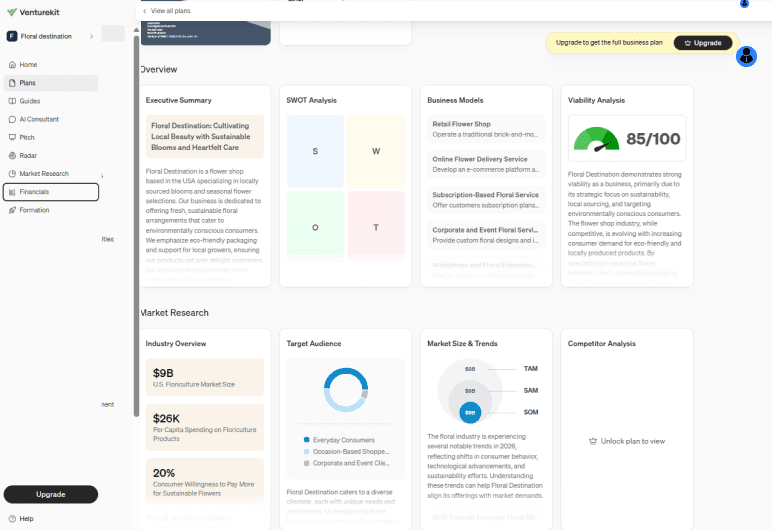
But the tool doesn't ask for much upfront, and the output feels a bit generic. The sections could apply to almost any business, and the financials needed real work before they felt right.
The editing, though, is where Venturekit pulls back some ground. Every section can be edited, the AI consultant helps rewrite and refine sections cleanly, and the financials stay adjustable after generation. That flexibility matters when you want the plan to feel like yours.
So, if you need a polished plan with a pitch deck attached and you're fine doing the editing yourself, Venturekit gets you there for less. Just check the billing terms before you pay. Those have come up in user reviews more than once.
Pricing
- Free: $0
- Pro: $8/month
- LLC Formation: $169/year
Ratings
Trustpilot suspended Venturekit. And no listings on G2 or Capterra.
Final thoughts
So that's the list. Six tools I tested, each one with its own strengths and gaps. But the right choice really comes down to where you are in your planning stage.
- Day-one founders don't need investor-list features.
- Bootstrapped operators don't need a $240/year subscription.
- Solo planners don't need team collaboration.
Picking a tool that's bigger than your stage just means paying for things you won't use.
If you're just starting out and want a tool that helps you finish a plan, with no subscription, and a plan you can actually edit afterwards, Bizplanr is the easiest place to start.
Use the free AI plan generator to test it out, or upgrade to a $99 lifetime for full workspace access, AI plan generation, and editable financials. Pay once, build whenever you're ready. Try Bizplanr now!
Get Your Business Plan Ready In Minutes
Answer a few questions, and AI will generate a detailed business plan.
Frequently Asked Questions
What's the best free alternative to ProAI?
Using Bizplanr's free AI plan generator is the strongest free option. It includes plan generation, editing, and financials with no credit card required. If you outgrow it, the $99 lifetime upgrade gives you full workspace access without a subscription.
How does Bizplanr compare to ProAI?
Bizplanr and ProAI both generate full business plans, but they're built for different stages. Here's how they stack up:
- Bizplanr costs $99 once for lifetime access, while ProAI runs $120 to $360 per year.
- Bizplanr's free version generates a complete first draft as a PDF without sign-up. ProAI requires an upgrade to access the full draft.
- Bizplanr's 5-year forecasts stay editable. ProAI's are yearly-view with a locked Year 1 growth rate.
- ProAI includes pitch decks and an investor list. Bizplanr doesn't.
- Bizplanr fits founders still building their plan. ProAI fits founders ready to pitch investors.
Is ProAI worth the $120/year price?
It depends on whether you need the funding-side features. ProAI's value is in the pitch deck, investor list, and industry reports, but those sit on the $240/year tier, not the $120/year entry. If you're not actively pitching investors, you're paying for features you won't use.
Can I use any of these ProAI alternatives to pitch to investors?
Yes, and Upmetrics is the strongest pick for that. It includes:
- A built-in pitch deck builder
- Multi-year financial forecasts you can edit
- Team collaboration so a co-founder or advisor can join
The plans are structured the way investors actually expect, which means less rework before a pitch.